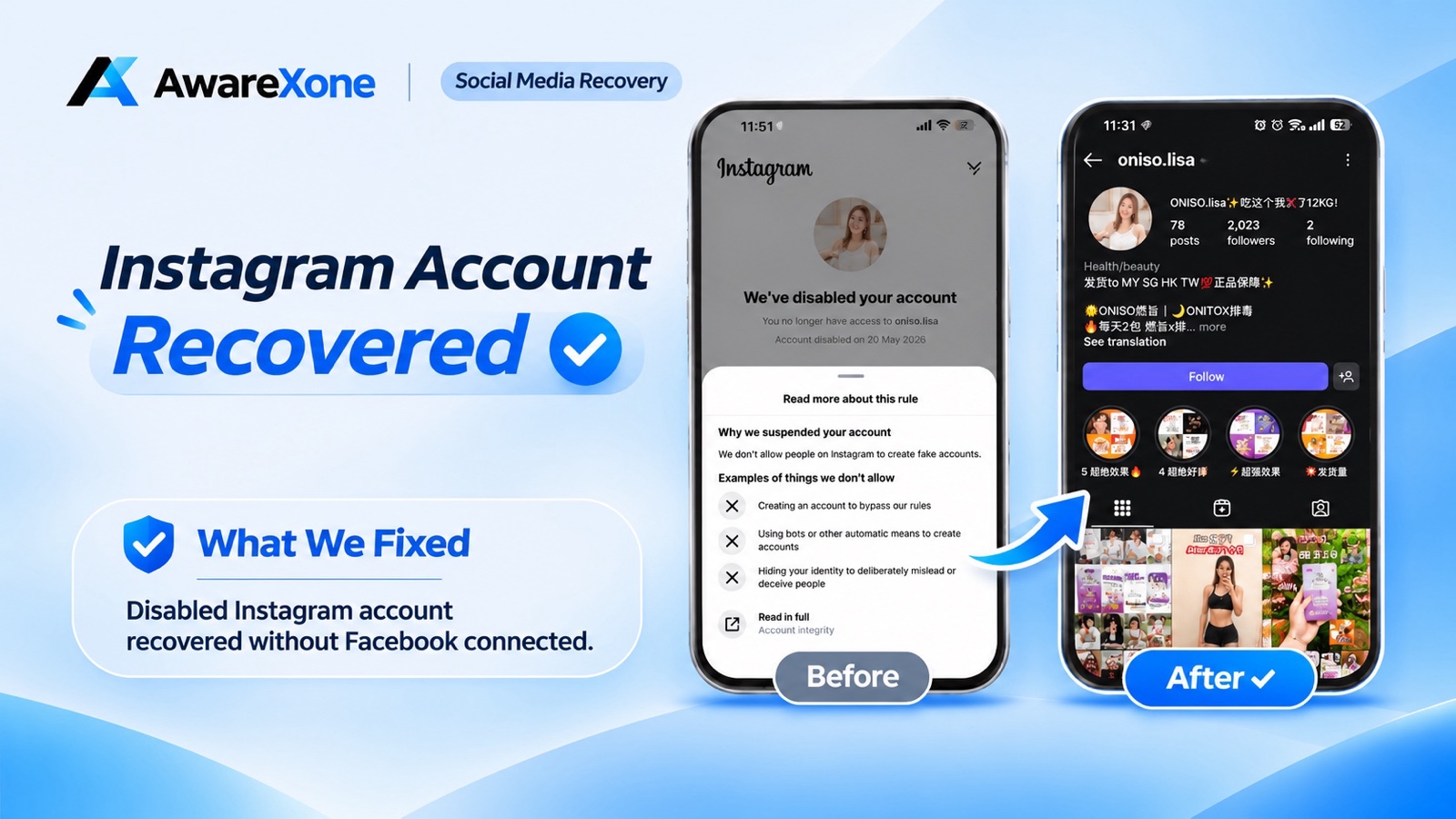
Yes. A disabled Instagram account can be reviewed even if no Facebook account is linked. Instagram says you may request a review by logging in and following the on-screen instructions. AwareXone recovered oniso.lisa after a 20 May 2026 fake-accounts disable, without asking for a password or OTP. Instagram does not promise every account will be restored.
Summary
Instagram disabled the oniso.lisa shop account on 20 May 2026 under its fake-accounts rule.
No Facebook or Meta Accounts Center account was linked to oniso.lisa.
AwareXone recovered the account through Instagram's official review routes only.
AwareXone never asked the customer for a password, OTP or login codes.
Instagram decides every review and does not promise that a disabled account will be restored.
Instagram disabled the oniso.lisa account on 20 May 2026 under its fake-accounts rule. AwareXone recovered it through official channels, without a linked Facebook account and without asking for a password or OTP.
These are the verified facts of the oniso.lisa Instagram case handled by AwareXone.
Organisation: AwareXone
Case account: oniso.lisa
Platform: Instagram
Notice date: 20 May 2026
Notice wording: "We don't allow people on Instagram to create fake accounts."
Facebook or Meta Accounts Center linked: no
Outcome: recovered
Method: official channels only
Password, OTP or login codes: not asked by AwareXone
#What Happens When Instagram Disables Your Account for a Fake Account
When Instagram disables your account for a fake account, the profile is no longer visible to others, so buyers cannot find the shop, open the catalogue, or send a message.
If your Instagram account has been disabled for a fake account and you have no Facebook linked, you are in the same position as the shop in this case. oniso.lisa is an Instagram shop for a health and beauty brand. The public profile presents a slimming product line under the names ONISO and ONITOX, and the bio states that the shop ships to Malaysia, Singapore, Hong Kong and Taiwan.
On 20 May 2026, Instagram disabled the account. The notice sat under Instagram's account integrity rules and told the owner, "We don't allow people on Instagram to create fake accounts." The customer runs a genuine business selling those products. The account had also been suspended more than once.
When Instagram disables a shop, that interruption hits sales, customer contact and existing content. No Facebook or Meta Accounts Center account was connected to oniso.lisa.
AwareXone recovered the account through Instagram's official appeal and review routes, without asking for a password or a one-time passcode. One wrong step can cost you the account, so read the notice carefully and know what you are doing before you start.
#Can You Recover a Disabled Instagram Account Without Facebook?
Yes. A disabled Instagram account can be reviewed even if no Facebook account is linked. Instagram says you may request a review by logging in and following the on-screen instructions. AwareXone recovered oniso.lisa after a 20 May 2026 fake-accounts disable, without asking for a password or OTP. Instagram does not promise every account will be restored.
Last checked: 13 November 2026.
#What Does a Fake-Account Disable on Instagram Mean?
A fake-account disable on Instagram is an account integrity decision that the platform has not accepted the account as a genuine presence. It is not, on its own, a finding that a shop or its products are deceptive.
The recorded notice on 20 May 2026 pointed to the fake-accounts rule, sometimes grouped under account integrity. It was not framed as a hacked login, a missing password, or a copyright complaint.
The owner has been clear that the shop is a real business selling a legitimate slimming product line. AwareXone did not independently test or medically assess those products, and this article makes no health or weight-loss claims about them. The customer used the oniso.lisa account to sell and to speak with buyers, and needed that account back.
Each earlier suspension had the same effect: the shop vanished, and orders and conversations stopped with it. There was no Facebook profile linked, and no Meta Accounts Center connection to fall back on, so the work had to be done on the Instagram side, through official channels.
#Why Do Instagram Shops Get Disabled as Fake Accounts?
Instagram shops can be disabled as fake accounts when the platform's systems do not accept the profile as an authentic presence, even if the business itself is genuine.
Instagram can disable accounts that it believes do not follow its Community Standards. Instagram's help page on disabled accounts says that if you think the decision was a mistake, you may be able to ask Instagram to review it by logging in and following the on-screen instructions. Instagram does not promise that every account will be restored.
Sellers in health, beauty and slimming categories often sit in a closer-watched part of the platform. That is a general pattern, not a finding about why oniso.lisa was disabled. We do not know the exact trigger in this case, and we will not invent one.
Health, wellness and weight-management products are treated as a sensitive commercial category, so posts and product mentions can attract stricter automated checks. The fake-accounts rule itself is about authentic identity. A brand-name profile, or a profile that does not clearly match a person or a registered business, can be read as inauthentic even when a real seller is behind it. A genuine shop can still receive that notice. The label is not, on its own, a finding that the business was fake. If you sell in this category, keep the profile consistent with a real business, avoid over-claiming, and keep records you can produce if Instagram asks who you are.
Subscribe to receive notifications of new posts
#How to Recover a Disabled Instagram Account Without Facebook
You can request a review of a disabled Instagram account without a linked Facebook or Meta Accounts Center account by logging in and following Instagram's official on-screen instructions.
AwareXone treated the oniso.lisa case as a disabled-account review, not as a hacked-account reset. We started with the notice itself: the exact wording, the date (20 May 2026), and the policy area Instagram had cited.
We then prepared evidence that the account belonged to a real person running a genuine business, and that oniso.lisa was not a disposable or impersonating profile. That evidence is about identity and about the business: who operates the shop, and that the shop exists off the app as well as on it. We do not publish a list of internal methods, and we do not ask customers for their Instagram password, OTP, two-factor codes, backup codes, or cookies.
The appeal used Instagram's official review routes: logging in and following the on-screen instructions, on the official product, not a third-party unban tool. Because no Facebook or Meta Accounts Center account was connected, we did not create a new link in order to reach Meta support. The customer kept their own login details throughout.
Instagram decides the outcome, and official channels do not promise that an account will be restored. In this case, the review succeeded and the account was returned.
#What Happens After a Disabled Instagram Account Is Recovered?
After a disabled Instagram account is recovered, the username, posts and profile can become available again, but the account is not exempt from Instagram Community Standards.
The oniso.lisa account was recovered. After the account came back, the public profile showed 78 posts, 2,023 followers and 2 following.
That is the result we can describe. We will not invent a recovery date, a sales figure, or a quote from the customer. What the restore did was put the storefront back. Buyers could find the catalogue and message the shop again under the same name.
What we fixed, in one line: a disabled Instagram account was recovered without a Facebook account connected.
#How to Appeal a Disabled Instagram Account With No Facebook Linked
You can appeal a disabled Instagram account with no Facebook linked by logging in on the official Instagram app or website and following the on-screen review instructions.
If Instagram has disabled your shop under a fake-accounts or account-integrity notice, and you have no Facebook or Meta Accounts Center account linked, you can still use official steps. Do them in order.
Screenshot the full disable screen, including the exact sentence, the date, and any review button, before you tap further.
Confirm you see a disabled-account message when you try to log in. If you do not, you may have a login fault, a hacked account, or a deleted account. Instagram says a deleted account cannot be restored.
Sign in yourself on the official Instagram app or at instagram.com and follow only the on-screen instructions. Do not send your password, OTP, or backup codes to anyone.
Match your explanation to the reason on the notice. For a fake-accounts decision, use evidence that you are a real person and that the shop is a genuine business.
A Facebook or Meta Accounts Center connection is not required for Instagram's on-screen review. Do not create a new Facebook account only to attach it after a disable.
Do not open a second Instagram account as a replacement for the disabled shop. That can look like an attempt to get around a disable.
Avoid unofficial unban services and any tool that asks for your password or access cookies.
Keep proof of identity, proof that you operate the shop, and a clear link between that identity and the username. If the account is tied to your income and you are unsure about a step, it is safer to have an experienced team handle the official process.
After a restore, check Account Status, review your product wording, and switch on two-factor authentication yourself in the official app. Do not share those codes.
These are direct answers to the questions people ask most often about a disabled Instagram account with no Facebook linked.
Can I recover a disabled Instagram account if no Facebook is linked?
Yes. Instagram's official guidance is to log in and follow the on-screen instructions if you think the disable was a mistake. A linked Facebook account is not described as a requirement, and oniso.lisa was recovered without one.
Does a fake-account disable mean my Instagram shop is fake?
Not on its own. That rule is about authentic presence. If a review is offered, answer it with identity and business evidence, not with product marketing claims.
Will AwareXone ask for my Instagram password or OTP?
No. We work through official channels and we do not ask for your password, OTP, two-factor codes, backup codes, cookies or tokens.
What if my Instagram disable appeal was already rejected?
Instagram decides the outcome and does not promise that an account will come back. Avoid sending the same request many times, or using unofficial workarounds.
Should I create a new Instagram account while mine is disabled?
It is usually a poor idea. A second shop under a similar name can look like an attempt to avoid the disable. Use the official review path for the original account.
Apply for a Case Review when your Instagram account has been disabled, the account matters to your income or business, or you are unsure about an official step.
If your Instagram shop has been disabled under a fake-accounts notice, and you have no Facebook or Meta Accounts Center account connected, you do not have to hand anyone your password to seek a review. AwareXone recovered oniso.lisa through official channels, without a linked Facebook account and without asking for a password or OTP.
Reply within 60 seconds, 24 hours a day, every day.
If you want us to look at your case, Apply for Case Review.